Configuring TinyMCE using EPiServer custom property settings
This technical article was first published over 2 years ago and may discuss features and approaches that are no longer relevant for the current version of the platform.
The TinyMCE rich-text editor provides great flexibility for editors to create and mark-up content within EPiServer. TinyMCE is a seemingly infinitely configurable tool and can be configured to show / hide many of its available features. One of the ways EPiServer Administrators / Developers / Integrators can help is by configuring TinyMCE to only show features that are necessary in a given context.
This posts demonstrates how to modify TinyMCE either globally or on a property by property basis using custom property settings.
Property Settings
Property Settings are not a new feature. They were introduced in CMS 6 and are used to store settings for page properties. They are editable from within the Admin mode. One of the primary uses of this feature is to configure settings and buttons that are shown to editors when using the TinyMCE text-editor. Property settings can also usefully be used to provide editor managed drop-down lists.
TinyMCE custom property settings
You can specify which buttons to use for each XHTML property instance on a defined page type. This can be managed in Admin mode in the following way.
- Go into EPiServer Admin mode
- Navigate to the Page Type tab and to the specific Page Type you want to modify.
- Pick the XHTML property you wish to add custom settings
- Click the Custom Settings tab
You should now see the following interface:
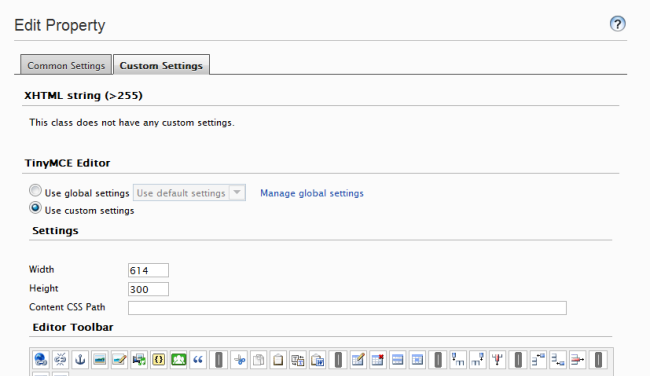
You can use this to either define a custom setting that will be applied to this instance, or define a new global setting that will be used by default.
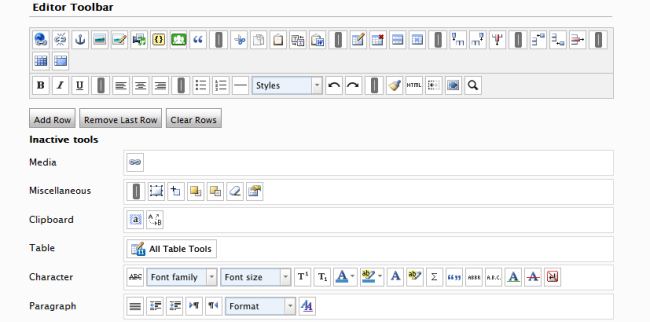
The TinyMCE toolbar can be edited by dragging and dropping buttons from the inactive tools to the editor toolbar area. You can adjust the position of existing feature buttons and the overall layout of your toolbar.
Global settings
Defining custom settings for each XHTML property on every page type will; for any reasonably sized EPiServer installation be a very time-consuming task. It is likely that you will have a set of common TinyMCE configurations that you wish to apply and share between different properties across different page types. These can be managed by creating them as a global property setting, and adding some additional meta data such as a name and description. Global settings can then be selected on each property that you wish to use them for.
Default settings
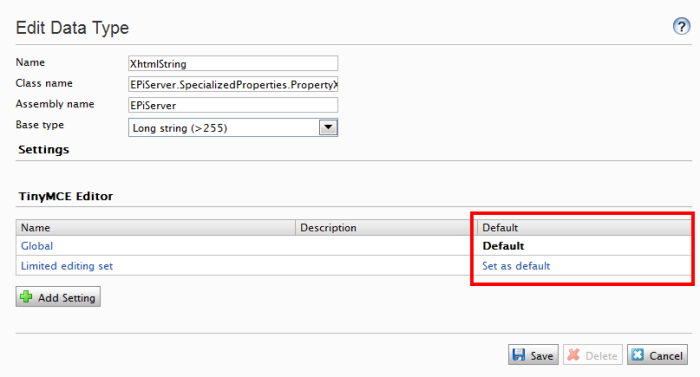
Any XHTML property that does not have a custom property setting will use the default EPiServer XHTML property setting, meaning the TinyMCE toolbar will display will a pretty full list of feature buttons and settings. The default option can be changed to any one of your defined global property settings. This allows you to apply settings across the board. This is useful for modifying any TinyMCE instances that appear in DynamicContent controls.